
Microsoft SharePoint Services South Africa
Enterprise business
collaboration platform
Easily control costs and reduce risks associated with IT through SharePoint.
SharePoint Online lets you bring your work into a clearer structure. But the value comes from planning the sites and day-to-day habits around it.
If you’re considering Microsoft SharePoint services in South Africa, SevenC can help you decide what belongs in SharePoint and what needs to be in place before you move your files.

What is Microsoft SharePoint?
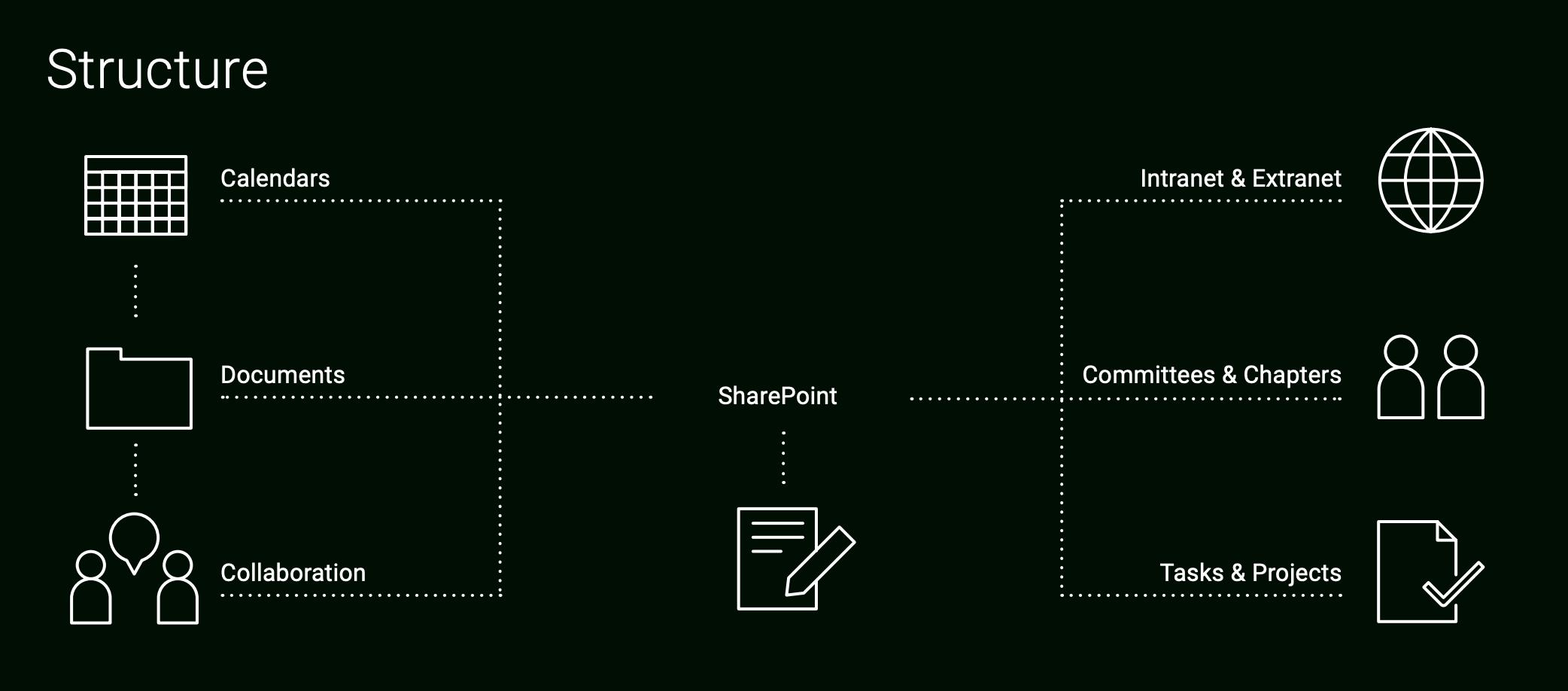
SharePoint is a Microsoft platform for organising and sharing business information. Teams use SharePoint to publish internal information and keep track of structured work.
Think of a project team that needs shared contracts and a reliable place for the latest version of a document. SharePoint puts these pieces together. It can also support a company intranet or a knowledge base that people can search when they need an answer.
Product overview: SharePoint collaboration and content management
Microsoft SharePoint has supported business collaboration since 2001. Today, SharePoint Online works with Microsoft 365 applications, email and browsers to help teams manage content, information and shared business processes. SharePoint Server remains a separate deployment option for organisations with specific infrastructure requirements.
What can businesses use SharePoint for?
Keep shared documents in one sensible place. When proposals and working documents are scattered across email attachments and individual drives, finding the current version takes time. Libraries let you organise shared files and work on documents together, with version history where it’s needed.
Give teams a place to work. A department or project site can hold the updates and information its members need. This makes shared work easier to follow without creating a new site for every small task.
Make internal information easier to find. An intranet can bring together policies and useful links. A knowledge area can keep procedures and answers available after the person who wrote them has moved on. Someone still needs to own and update that content.
Track information that doesn’t fit neatly into a document. SharePoint lists let you manage items like equipment records or simple project trackers. Libraries and lists can be arranged around the way your business works.
Control who sees what. Different sites and content can have different access arrangements. This is important when a shared project area and a confidential management area are located in the same wider environment. Permissions need deliberate planning; a folder name alone doesn’t protect sensitive information.

Product features
Centralised administration
Maintain oversight of sites, settings and access within an agreed governance model.
Customisable team spaces
Organise sites, libraries and lists around the work each team needs to complete.
Collaboration
Help team members stay informed and connected throughout a project lifecycle.
Site consolidation
Bring appropriate shared information into a more consistent platform, with migration planning to avoid unnecessary duplication.
Security and integrity
Use site, library and item permissions where appropriate, supported by clear ownership and periodic reviews.
Simpler business tools
Create useful lists, libraries and basic solutions; more complex requirements may need specialist configuration or development.
Information discovery
Use Microsoft 365 search and well-organised content to help staff locate documents and expertise.
Business processes and reporting
Connect SharePoint with Power Automate and suitable Microsoft 365 or Power Platform reporting tools when the use case requires them.
Product advantage
Simplify everyday activities
Use libraries, lists and supported automation to coordinate reviews, approvals and recurring tasks.
Connect employees with information
Make relevant documents, internal knowledge and expertise easier to find.
Support governance and compliance
Define access, retention and information-handling requirements with the appropriate Microsoft 365 controls and organisational policies.
Improve access to business information
Connect appropriate tools and data sources, subject to integration, security and licensing requirements.
Support informed decisions
Use suitable reporting tools and clearly maintained business data rather than assuming SharePoint alone provides a full business intelligence platform.
Provide an integrated platform
Plan how SharePoint, Teams, OneDrive and Power Platform should work together.
SharePoint Online and Microsoft 365
SharePoint works best when you understand what the other Microsoft 365 tools are doing. Files shared in a Teams channel are generally stored in the connected SharePoint site, so a decision about Teams membership can affect access to those files. OneDrive is usually the starting place for an individual’s working files, while SharePoint is better for information a team or business needs to keep and manage together.
Microsoft Entra ID manages identities and groups that underpin access. Power Automate can connect SharePoint to approvals and notifications. Depending on the requirement, other Power Platform tools can use SharePoint data too, although the right data store depends on the scale and complexity of the job.
You don’t need to move every file into a SharePoint site because you use Microsoft 365. SevenC can help you decide where information belongs and make the tools work together in a way your people can understand. See our Cloud Services for the wider environment in which SharePoint exists.

SharePoint permissions, security and governance
Before moving a large collection of files, ask a few questions. Who should own each site? Which teams need to edit content, and who only needs to read it? Can anyone invite an external guest? What happens when someone changes roles or leaves?
A sensible information structure starts with the work your teams do. Sites need clear purposes and content needs an owner. Otherwise, new sites and duplicate libraries can multiply until nobody is sure which copy to trust. Moving a messy file server into SharePoint without sorting its contents gives the mess a new address.
Permissions need the same attention. Access can involve Microsoft 365 groups, Teams membership, site roles and sharing settings. A heavily customised web of exceptions is difficult to maintain. Decide who may create sites and share externally and review access periodically, especially for sensitive information. When a site is connected to Teams, membership should be managed with that connection in mind.
Governance is the set of decisions that keeps the environment useful after launch: naming and ownership, how content is organised, who approves new sites, how old material is handled and who responds when access is wrong. SharePoint provides controls, but your business still has to decide how to use them. SevenC can design those rules before a rollout or put order into an environment that has grown without them.
Legacy product descriptions referred to out-of-the-box workflows for document reviews, approvals and other processes. For SharePoint Online, modern automation should instead be assessed and designed using Power Automate or another supported solution.

SharePoint and workflow automation
Need a manager to approve a document or a team member to be notified when a request arrives? SharePoint can work with Power Automate to support those processes. You can build a flow around a list item or document to route an approval and record what happened. Start with the everyday business process, including its exceptions, before automating it.
If you have an older SharePoint setup, check which workflows it relies on. Microsoft fully retired SharePoint 2013 workflows in SharePoint Online on 2 April 2026. Existing processes that depended on them need assessment and, where still required, replacement with Power Automate or another supported solution. Migration isn’t always a matter of copying a workflow step for step; it’s a chance to confirm who owns the process and whether it still serves a purpose.
SharePoint Online vs SharePoint Server
SharePoint Online is the Microsoft-hosted service in Microsoft 365. Microsoft manages the underlying cloud platform, while your organisation is responsible for choices such as content structure and access.
SharePoint Server is deployed and managed on your organisation’s own infrastructure or a hosted environment you manage. Most businesses evaluating Microsoft 365 collaboration will start with SharePoint Online, but an existing server environment could need a separate assessment before any migration decision.
When does your business need SharePoint services?
It may be time to get advice if:
- Your staff keep asking which version of a document is final.
- Business files are spread across file servers, email, personal drives and disconnected tools.
- You have SharePoint already, but sites and permissions have grown without clear ownership.
- You need to move shared information into Microsoft 365 without disrupting daily work.
- A legacy approval or notification process needs to be rebuilt.
- You need clearer rules for external sharing and access to sensitive material.
SharePoint services from SevenC
SevenC assesses how your business currently stores and shares information, then helps you decide what SharePoint should do for you.
If you’re migrating, the work should account for what people use now and how staff will find it afterwards. SevenC can also connect SharePoint with Teams and the wider Microsoft 365 environment, review governance and consider how Power Automate could replace or improve a process.
Does your business need SharePoint?
SharePoint is a good fit if you need a managed place for internal information and team collaboration in Microsoft 365. It needs a clear purpose and people willing to own the content. If the biggest problem is that nobody can find a file, buying more software won’t answer the question of where it should live.
For wider Microsoft 365 infrastructure, hosting and related services, explore SevenC’s Cloud Services offering.
Tell SevenC how your teams work today and where information gets stuck. We can help you work out whether SharePoint Online is the right fit and what a practical rollout would involve. Contact SevenC to discuss your requirements.
Contact us
Does your business need IT support, IT problems fixed, a quote or new IT strategy? It is all possible with SevenC.
Contact us by completing the form below:




Physical address
Unit 36, Sunninghill Office Park
Peltier Drive
Sunninghill
Johannesburg
South Africa
⟶ Directions
Postal address
SevenC Computing
PO Box 2481
Sunninghill
2157
South Africa
